LOGBOOKAIR

1 Month Free PREMIUM Trial · No Card

The AI-Managed Pilot Logbook

Your logbook should not be your hobby. Let the AI keep it accurate, complete, and ready — so your only job is to fly. Try every PREMIUM feature free for 1 month.

How AI-Managed Works

Three steps. The AI does the rest.

1

Email or import

Forward your roster export, or upload it from the app. AI detects format and parses it.

2

AI validates & fixes

Issues are detected, AI Auto-Fix proposes corrections, you approve in one click.

3

Logbook ready

Compliant, validated, exportable as JAR-FCL / EU-FCL PDF whenever you need it.

Premium AI-Managed

AI Auto-Fix — registrations, flight crew, the lot

Imports leave behind hundreds of small inconsistencies: the same aircraft registration written three different ways (“SXDGA” / “SX-DGA” / “SX DGA”), the same captain spelled with a trailing space, an airline that exists only because an import header was misread. PREMIUM goes one step further than detection: the AI proposes the correct merge / fix / deletion, applies it on approval, and logs every change so you can roll back. A real LOGBOOKAIR account routinely starts with hundreds of issues across registrations, airlines, models and flight crew — cleaned up in a single Auto-Fix session.

  • Aircraft registrations: dash / space variants merged into one canonical row
  • Flight crew: case- and punctuation-tolerant duplicate detection
  • Aircraft models: IATA-code-as-name rows merged into the long model name
  • Airlines: orphan / import-header rows deleted safely
  • Full audit log: every AI fix is reviewable and reversible (record_backups)
AI Auto-Fix3 issues fixed
  • Aircraft SX-DGZ not in fleet on 14 Mar 2025

    Reg added → A320, Aegean fleet

  • Block time 02:55, flight time 03:05 — inconsistent

    Flight time corrected to 02:55

  • Night minutes missing for LGAV → EGLL

    Computed: 00:42 night

Auto-Fix DemoAnimated
Animated demo: AI detects 5 logbook issues, processes fixes automatically, all resolved with audit log
Premium AI-Managed

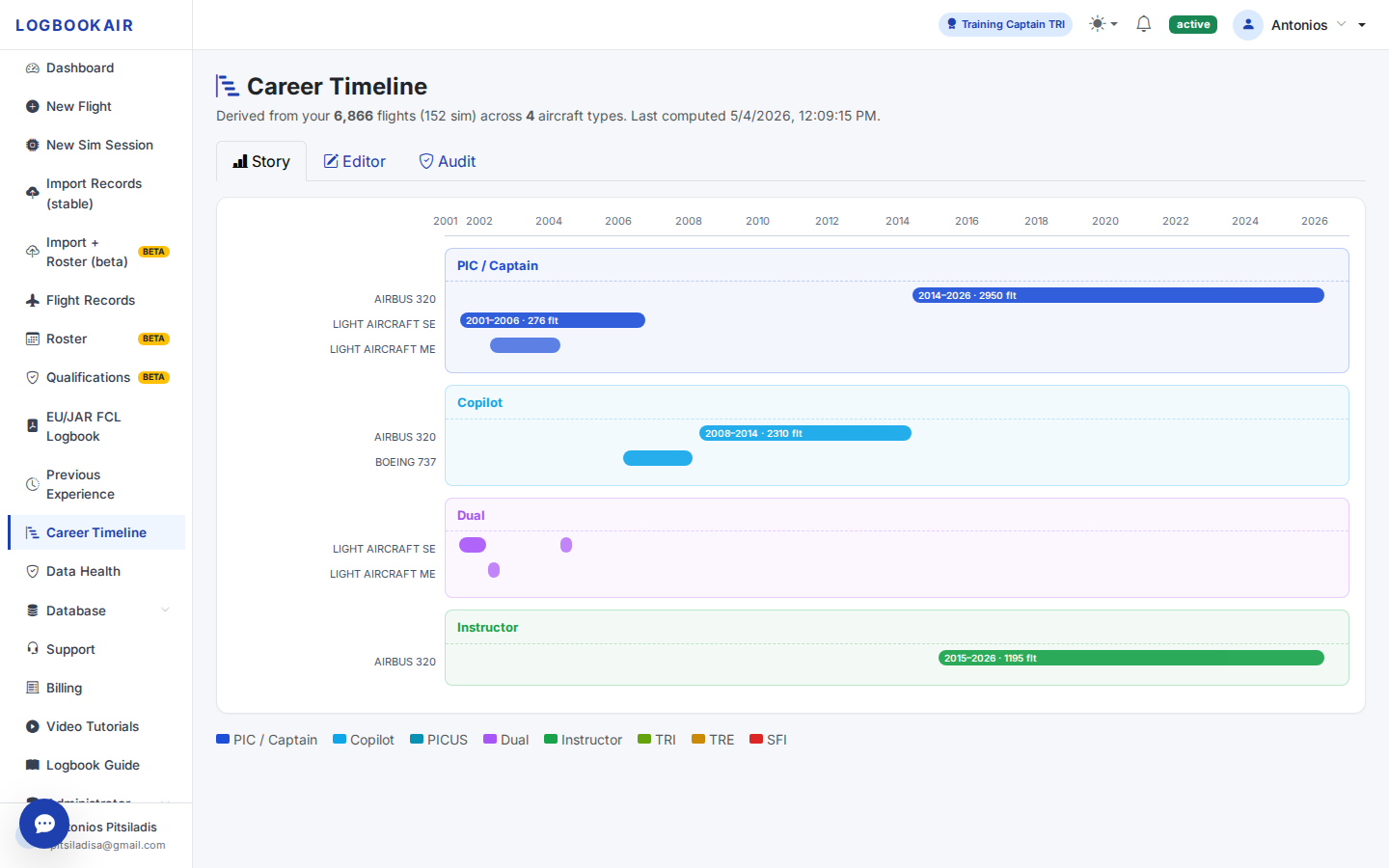
Career Timeline — visualise your history & milestones

The Career Timeline is your logbook history at a glance: when you started flying each type, when you upgraded to Captain, when you were qualified as Instructor or Examiner, every milestone in a single visual story. Beyond visualisation, it actively assists AI error detection — inconsistencies between your timeline and your flights (e.g. PIC time logged before your command upgrade) are flagged and one-click fixes are proposed.

  • Visualise type-rating starts, command upgrades, instructor / examiner roles, base changes
  • AI cross-checks the timeline against your flight records and surfaces inconsistencies
  • One-click fixes for detected issues (missing rating events, role mismatches, etc.)
  • A clean career story for yourself — not for authority checks, that's what the JAR-FCL PDF is for
LOGBOOKAIR · Career TimelineReal screenshot
LOGBOOKAIR Career Timeline view: PIC/Captain, Copilot, Dual and Instructor periods across A320, B737 and light aircraft from 2001 to 2026
Premium AI-Managed

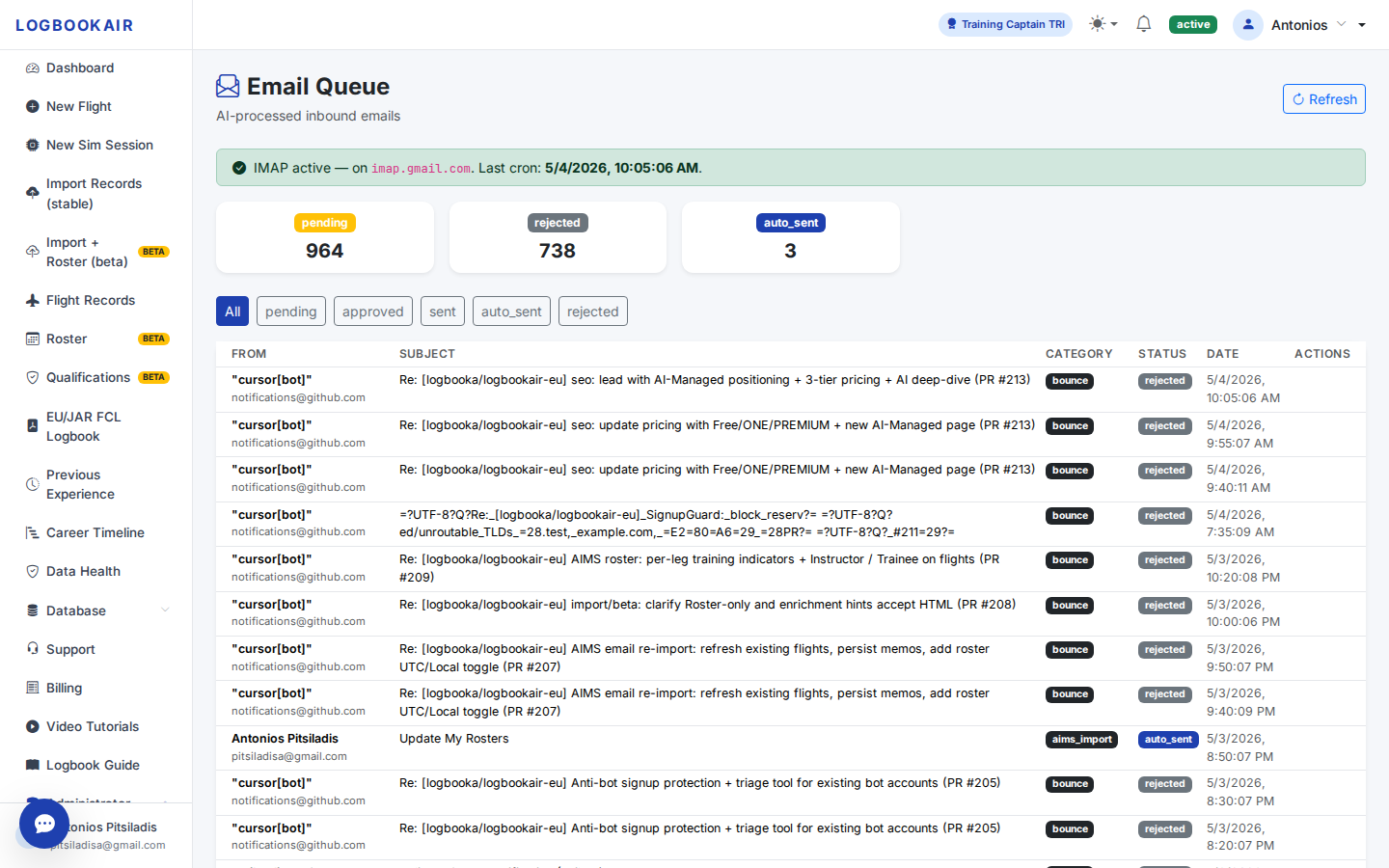
Email your logbook — the AI imports it

Forward your AIMS roster, JarFCL report, iFlight CSV or any supported logbook file as an email attachment to admin@logbookair.com from the address registered on your account. The AI matches you by sender, parses CSV / XLSX / HTML / PDF / TXT, imports the flights into your logbook, recomputes night hours and qualifications, and replies with a summary. You never have to log in.

  • Forward from your phone after a rotation — no app login required
  • Sender is matched to your LOGBOOKAIR account; no impersonation risk
  • AIMS, iFlight and other supported formats parsed automatically (CSV / XLSX / HTML / PDF / TXT)
  • Confirmation email with import summary (flights added, conflicts, warnings)
LOGBOOKAIR · Email Queue (admin)Real screenshot
LOGBOOKAIR admin Email Queue showing real inbound emails — including a pilot's roster forwarded to admin@logbookair.com classified as aims_import and auto-imported
Premium AI-Managed

Ask anything about your logbook

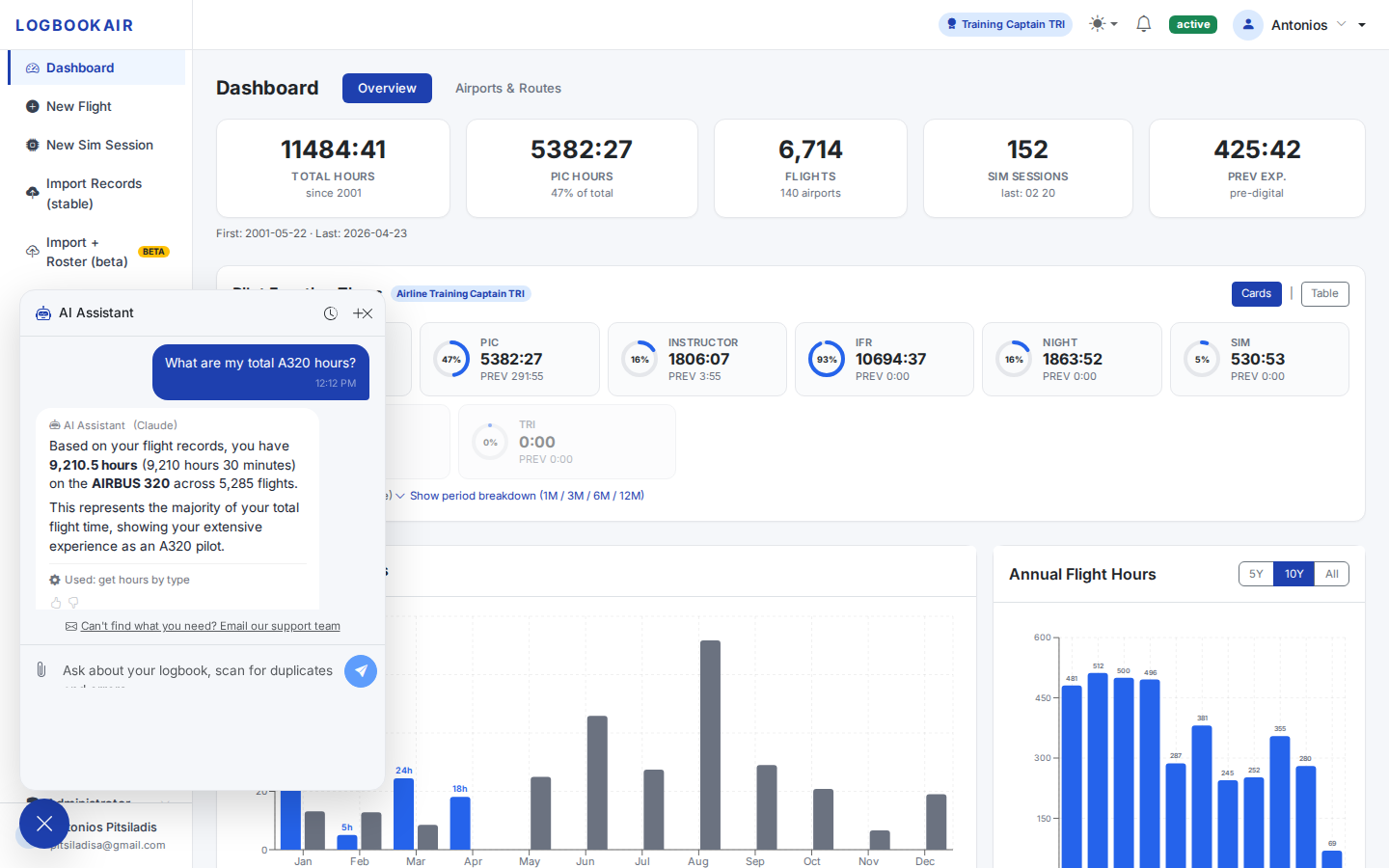
PREMIUM members get unlimited access to the LOGBOOKAIR AI Chat, our premium AI engine trained on aviation logbook semantics. Ask about your hours, currency, qualifications, types, routes, instructor time, multi-pilot vs PIC — in plain English, with answers grounded in your actual data.

  • Unlimited messages on PREMIUM (Free tier: 20 msgs/day on ONE)
  • Aviation-tuned: understands ICAO codes, JAR/EU-FCL terminology, type ratings
  • Answers cite the underlying flights, dates and totals
LOGBOOKAIR · AI ChatReal screenshot
LOGBOOKAIR AI Chat answering a real question about A320 hours from a pilot's logbook
AI Chat DemoAnimated
Animated demo: pilot asks AI about night hours on A320, AI responds with precise data from logbook
Included on ONE & PREMIUM

AI Validation — your records, audited continuously

Every plan from LOGBOOKAIR ONE upward includes AI Validation: the moment you import a roster or logbook file, the AI scans your catalog tables (registrations, airlines, aircraft models, flight crew) and your flights, then surfaces every issue in a single Data Health view with confidence ratings. You see what is wrong before it becomes a compliance issue — and on PREMIUM, AI Auto-Fix proposes one-click corrections.

  • Catalog scan: registrations, airlines, aircraft models, flight crew
  • Issue grouping: high-confidence (safe to auto-fix) vs medium (review-only)
  • Sunrise / sunset based night-hours computation per airport, with re-calc on demand
  • AeroDataBox post-import enrichment (PREMIUM): registrations, types, operators
LOGBOOKAIR · Data HealthReal screenshot
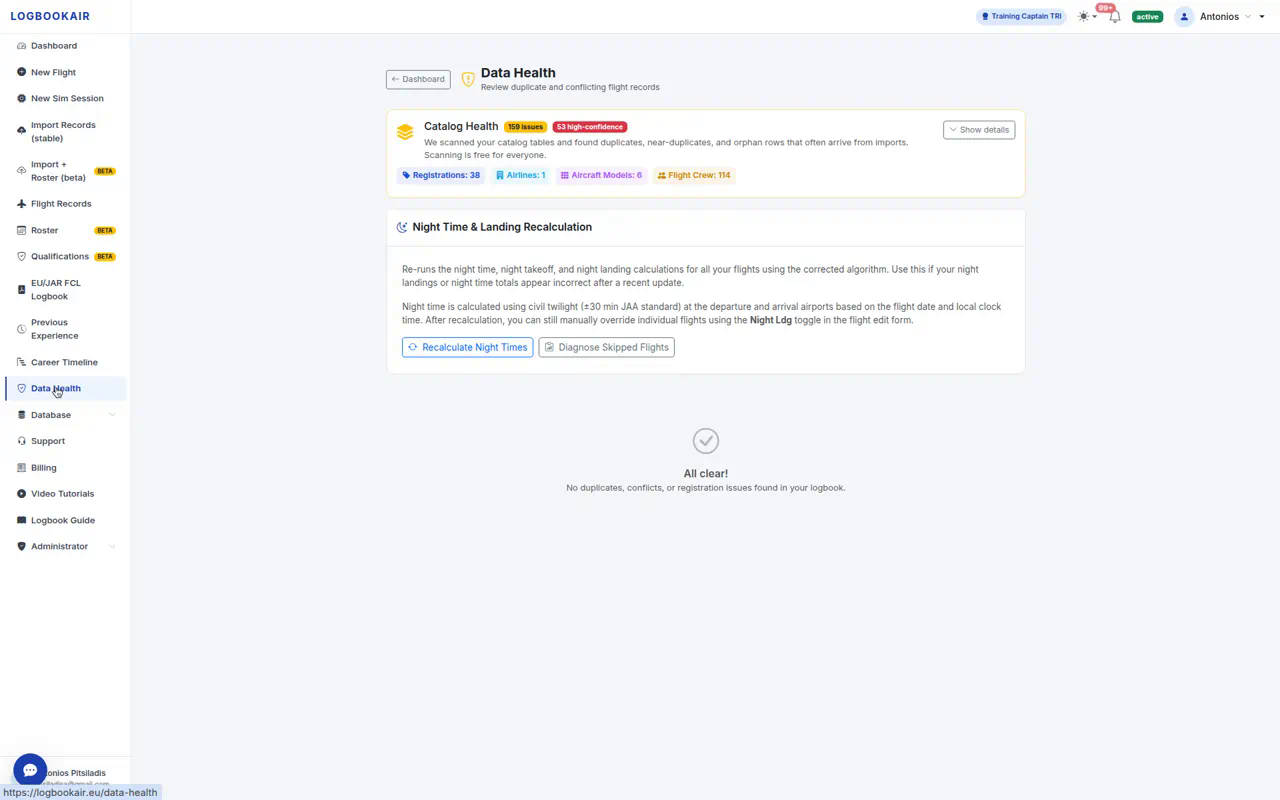
LOGBOOKAIR Data Health page: Catalog Health scan with 159 issues / 53 high-confidence (registrations, airlines, aircraft models, flight crew), plus Night Time recalculation

Real App · Real Data

AI in Action — from the LOGBOOKAIR app

These are real screenshots from the LOGBOOKAIR web app showing AI features working on actual pilot logbook data.

LOGBOOKAIR AI Auto-Fix showing detected issues being corrected automatically in a real pilot logbook
Premium

AI Auto-Fix

Real registrations, flight times, and night hours detected and corrected automatically.

LOGBOOKAIR AI Chat answering questions about a pilot's flight hours and routes
Premium

AI Chat

Ask anything about your logbook in plain English — hours, routes, currency, types.

LOGBOOKAIR Career Timeline showing pilot's history with type ratings, command upgrades, and instructor periods
Premium

Career Timeline

Your entire flying history visualised — type ratings, upgrades, instructor periods.

LOGBOOKAIR Email Import showing roster emails being parsed and imported by AI automatically
Premium

Email-to-Import

Forward your roster — AI parses, validates, and updates your logbook automatically.

LOGBOOKAIR Data Health page showing AI validation scan with issues grouped by confidence level
ONE & Premium

AI Validation

Continuous scanning of registrations, airlines, models, crew — issues surfaced instantly.

LOGBOOKAIR Dashboard overview showing total hours, PIC time, flights, monthly and annual charts
All Plans

Dashboard Overview

Your complete flying career at a glance — totals, charts, aircraft breakdown.

AI Basic vs. AI Managed

ONE gives you the AI as an assistant. PREMIUM gives you the AI as your logbook manager.

LOGBOOKAIR ONE

AI Basic Support

  • AI error detection on import
  • Flight-Number autocomplete
  • AI Chat — 20 msgs/day

LOGBOOKAIR PREMIUM

AI Managed Services

  • AI Auto-Fix of detected issues
  • Career Timeline (visualisation + AI assist)
  • Email-to-import (private inbox)
  • Unlimited Premium AI Chat
  • AeroDataBox enrichment
See full comparison →

Stop maintaining your logbook. Start using it.

Get 1 month of PREMIUM AI-Managed services free — no credit card. Already on LOGBOOKAIR ONE? Upgrade to PREMIUM for just €60 keeping your current expiry.